

AI LUT generator for your own footage

Drop a clip or a still

MP4, MOV or WebM up to 5 minutes, or a JPG, PNG or WebP still.

Choose a file

Your clip is opened in this browser and never uploaded.

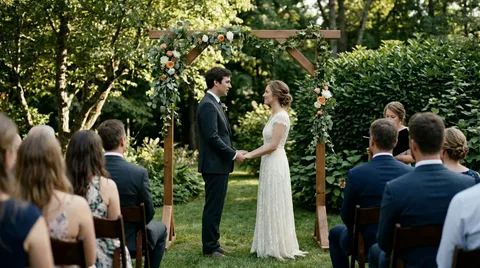
Before: A couple exchanging vows in a gardenBefore
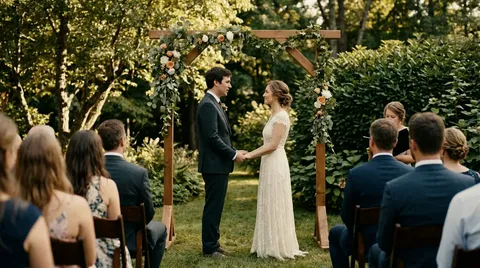
After: A couple exchanging vows in a gardenAfter

AI look: soft golden afternoon, creamy skin, muted greens

Keyframes are graded with Nano Banana 2.1 (Google); GPT Image 2 (OpenAI) is the second route. CinemaStudio.io is independent and not affiliated with Google, OpenAI or Higgsfield.

This LUT generator starts from your clip, not from a stock photo. The browser picks three keyframes, an image-edit model grades them toward the look you choose, and a 3D LUT is fitted from each original and graded pair with skin tones guarded. You get a .cube that loads in most editors that read .cube files, plus the fit error as a ΔE, so you know how closely the LUT follows the grade.

Updated

How it works

  1. 1

    Drop a clip and pick its input

    Open an MP4, MOV or WebM up to 5 minutes and 2 GB, or a JPG, PNG or WebP still. The clip is decoded in your browser and never uploaded. Choose Rec.709, S-Log3, LogC3 or V-Log so the LUT is built for that input.

  2. 2

    Choose the look and run it

    Pick a preset direction, a reference still you have the rights to, or type a description of up to 280 characters. An AI look is 104 credits for three keyframes: a wide shot, a face if there is one, and the brightest shot.

  3. 3

    Fine-tune and export

    Check the fit on the live preview with a before/after split, adjust strength, exposure, temperature, tint, lift, gamma, gain and saturation, then download the .cube at 17, 33 or 65 points or a graded MP4.

Good for

  • A wedding filmmaker giving a whole film one look and handing the LUT to an editor
  • A director trying several looks on one scene before the color session
  • Turning a reference still you own into a LUT built for your camera’s log curve
  • Describing a look in words when you have no reference to hand
Before: A couple exchanging vows in a gardenBefore
After: A couple exchanging vows in a gardenAfter
AI look: soft golden afternoon, creamy skin, muted greens
Before: A skateboarder mid-trick in a vertical frameBefore
After: A skateboarder mid-trick in a vertical frameAfter
AI look: punchy summer colour, deep blue sky

01

How a LUT creator fits a grade from three keyframes

A LUT creator has to answer one question: for every input color, which output color should come back? Here the answers come from pairs of images. Each keyframe is center-cropped to 16:9, 9:16 or 1:1, log keyframes are converted to Rec.709 first, and the model grades it with an instruction to change color only. The browser then solves a 33-point working grid by regularized least squares, with a smoothness term so neighboring cells cannot jump apart and gradients stay clean. Three keyframes matter because one frame rarely covers the whole range: the wide shot brings background and sky, the face brings skin, and the brightest shot pins the highlights. Colors that none of the frames contain are filled in smoothly from their neighbors rather than guessed.

02

What the ΔE number tells you

After the fit, held-back pixels go through the LUT and are compared with the graded keyframe in CIEDE2000. That formula measures color difference the way people see it. A mean ΔE around 1 is near the limit of what most people notice side by side; a mean above 3 is flagged as a loose fit. A loose fit usually means the model did something a LUT cannot do, such as brightening one face but not the same tone in the background, or darkening the corners. In that case the LUT carries the overall color move and leaves out the local one. Grading the keyframe again, or choosing a simpler direction, usually brings the number down.

03

Skin protection, and what a LUT cannot do

Viewers notice a bad grade on faces first, so the fit holds the hue shift on skin tones to 8°. That holds even if the graded keyframe pushed faces further toward teal or magenta. Brightness and saturation on skin can still move with the look. The limits matter just as much. A LUT maps one color to another and knows nothing about where a pixel sits, so it cannot recover clipped highlights, separate two light sources of different color in one shot, remove noise, or add grain and halation. Fix exposure and white balance before the LUT in your editor, and the LUT will then behave the same way on every shot of the scene.

Credits per job

The cost shows before a job runs. Failed keyframes are refunded. Plans and credit packs

JobCredits
AI lookThree keyframes graded, a LUT fitted in your browser (a still is one keyframe)104 credits
One keyframe againGrade one keyframe again with the same look35 credits
Grade notesThe look explained in colorist terms, to rebuild by hand4 credits
Preset looksFive fixed looks for Rec.709 and log footageFree
Shot matchingMatch a clip to a reference still or another clipFree
.cube and MP4 exportAny look, any size, rendered in your browserFree

Questions

Which AI models grade the keyframes?

Keyframes are graded with Nano Banana 2.1 (Google), and GPT Image 2 (OpenAI) is the second route. Both are told to change color only. The LUT itself is fitted in your browser, not by either model.

Does the AI change my footage?

Only the color. An edge-map check compares each graded keyframe with the original. If the model moved pixels, that keyframe is graded again free, once per look; if the retry moves pixels too, it is left out and its credits are refunded. Your clip is never uploaded, only the keyframes.

What do I get, and in what format?

A 3D LUT in .cube format at 17, 33 or 65 points, built for the input you chose and outputting Rec.709 at gamma 2.4; the header says so. You can also export a graded MP4 rendered in your browser, up to 1920 px on the long side, with the audio carried over.

How much does an AI look cost?

104 credits for three keyframes from a clip; a still is one keyframe, about a third of that. A failed keyframe is refunded automatically. Exporting the .cube is free and unlimited, and a new account gets one AI look free once the email is confirmed.

Is CinemaStudio.io tied to another grading app?

No. CinemaStudio.io is independent and not affiliated with or endorsed by Higgsfield. Google and OpenAI are named only to say which models grade the keyframes.