Free cinematic LUT looks for your clip

Drop a clip or a still

MP4, MOV or WebM up to 5 minutes, or a JPG, PNG or WebP still.

Choose a file

Your clip is opened in this browser and never uploaded.

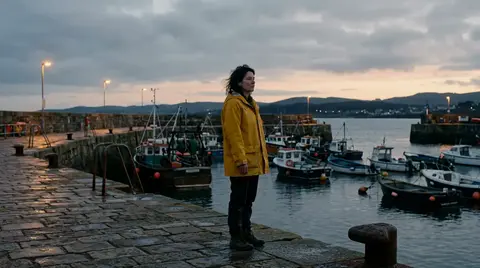
Before: A woman in a yellow raincoat on a harbour wall at duskBefore
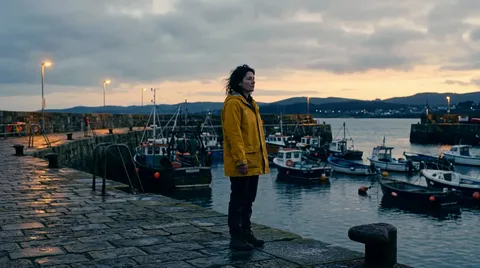
After: A woman in a yellow raincoat on a harbour wall at duskAfter

Preset look: Teal and Orange

Five cinematic LUT looks are free here, with no account and no sign-up: Teal and Orange, Bleach Bypass, Warm Negative, Cold Noir and Pastel. Each one previews on your own clip in the browser and downloads as a .cube at 17, 33 or 65 points, built for Rec.709, S-Log3, LogC3 or V-Log input. Nothing is uploaded and no AI model is called.

Updated

How it works

  1. 1

    Open a clip or still

    Drop an MP4, MOV or WebM, or a JPG, PNG or WebP. It is decoded in your browser and stays on your device.

  2. 2

    Pick the input and a look

    Say what the footage was shot in, then click through the five presets on the live preview with a before/after split.

  3. 3

    Adjust and download

    Set strength, exposure, temperature, tint, lift, gamma, gain and saturation, then download the .cube at 17, 33 or 65 points, free and unlimited.

Good for

  • Trying a look on your own footage before you buy or build anything
  • A LUT for log footage that already includes the conversion to Rec.709
  • YouTubers who want one consistent look across every video
  • Editors who need a starting look to show a client for approval
Before: A woman in a yellow raincoat on a harbour wall at duskBefore
After: A woman in a yellow raincoat on a harbour wall at duskAfter
Preset look: Teal and Orange
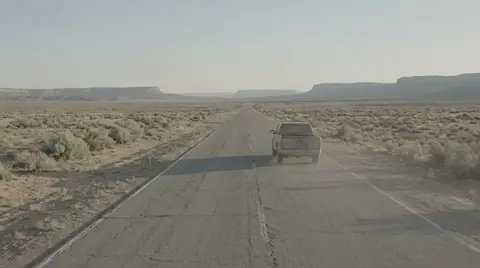
Before: A pickup truck on an empty desert road, shot flat in logBefore
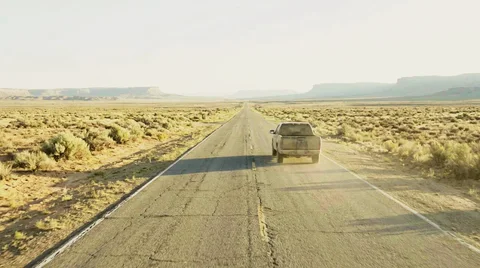
After: A pickup truck on an empty desert road, shot flat in logAfter
Preset look: Warm Negative

01

Five film look LUT presets and what each one does

Teal and Orange pushes shadows and backgrounds toward cyan and keeps highlights and skin warm, the complementary split seen in many action films. Bleach Bypass imitates skipping the bleach step in film processing: low saturation, hard contrast and bright, slightly cool highlights. Warm Negative leans toward a warm 35mm print, with slightly lifted blacks, amber mid-tones and highlights that roll off softly. Cold Noir is a cold night look with a blue cast, deep shadows and muted color. Pastel lifts the shadows, lowers contrast and tints highlights toward soft pink and shadows toward mint. Every one is plain math in your browser, which is why it costs nothing and needs no account.

02

Why the input color space changes the LUT

A LUT expects a certain kind of image. Rec.709 footage already has contrast and saturation baked in, while log footage such as Sony S-Log3, ARRI LogC3 or Panasonic V-Log is stored flat to keep more dynamic range. A look built for Rec.709 and dropped on log footage stays washed out, and a log look on Rec.709 crushes the shadows and oversaturates. Here you pick the input first, and the LUT includes the conversion from that log curve and gamut to Rec.709 display at gamma 2.4. The .cube header names the input, so whoever opens it later knows what it expects. Do not stack it on a camera conversion LUT, or the conversion happens twice.

03

Which cube size to download, and what a LUT will not do

A 33-point cube is the common default and suits almost every editor. Choose 65 points for heavy looks with strong hue shifts, where the extra points keep gradients in skies and skin smooth, and 17 points for older software or apps that limit LUT size. Whatever the size, a cinematic image is more than a LUT. Grain, halation, gate weave, vignettes and aspect ratio are spatial effects, and a LUT only maps colors. It also cannot rescue clipped highlights, noise in underexposed shadows or a shot lit by two different color temperatures. Correct exposure and white balance first, then apply the look, and it will sit the same way on every shot.

Credits per job

The cost shows before a job runs. Failed keyframes are refunded. Plans and credit packs

JobCredits
AI lookThree keyframes graded, a LUT fitted in your browser (a still is one keyframe)104 credits
One keyframe againGrade one keyframe again with the same look35 credits
Grade notesThe look explained in colorist terms, to rebuild by hand4 credits
Preset looksFive fixed looks for Rec.709 and log footageFree
Shot matchingMatch a clip to a reference still or another clipFree
.cube and MP4 exportAny look, any size, rendered in your browserFree

Questions

Are these cinematic LUTs really free?

Yes. The five presets run in your browser with no account, no sign-up and no model call, and the .cube download is free and unlimited.

Do the LUTs work on log footage?

Yes. Choose S-Log3 / S-Gamut3.Cine, LogC3 / ARRI Wide Gamut 3 or V-Log / V-Gamut as the input, and the LUT includes the conversion to Rec.709 at gamma 2.4.

What file format do I get?

A .cube 3D LUT at 17, 33 or 65 points, which loads in most editors that read .cube files. .3dl and HALD exports are not offered.

Why does my clip not look like the film a look reminds me of?

A film’s look comes from lighting, art direction, lenses, film stock, grain and a colorist working shot by shot. A LUT reproduces only the color mapping, so it gives you a consistent starting point, not the whole image.

Can I make my own look instead?

Yes. Match to a reference still or another clip for free, import your own .cube (up to 65 points), or run an AI look for 104 credits to fit a LUT from keyframes of your clip.